以下のようなレイアウトを作成するときにハマった話です。
左右に可変テキストがあり、テキストが長くなって画面に収まらなくなるときに左側の可変テキストの末尾が省略される仕様を想定しています。
(余談ですが、Layout Editorでは
android:ellipsize="end"
の指定は見た目に反映されないのですね…)
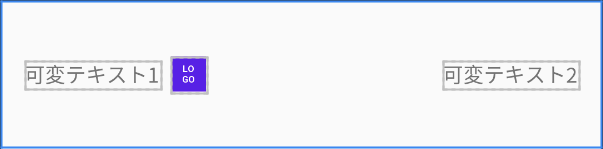 デフォルトのレイアウト
layout_constrainedWidth
を指定する
結論から言うと、
layout_width
にwrap_contentを指定した上で、以下のattributeを省略したいテキスト側のTextViewに指定すればOKです。
app:layout_constrainedWidth="true"
xml version="1.0" encoding="utf-8"
<androidxconstraintlayoutwidgetConstraintLayout
xmlnsandroid="http://schemas.android.com/apk/res/android"
xmlnsapp="http://schemas.android.com/apk/res-auto"
androidlayout_width="match_parent"
androidlayout_height="100dp"
androidpadding="16dp">
<TextView
androidid="@+id/textview1"
androidlayout_width="wrap_content"
androidlayout_height="wrap_content"
androidellipsize="end"
androidlines="1"
androidtext="可変テキスト1"
applayout_constrainedWidth="true"
applayout_constraintBottom_toBottomOf="parent"
applayout_constraintEnd_toStartOf="@id/logoview"
applayout_constraintHorizontal_bias="0.0"
applayout_constraintHorizontal_chainStyle="packed"
applayout_constraintStart_toStartOf="parent"
applayout_constraintTop_toTopOf="parent" />
androidid="@+id/logoview"
androidlayout_width="24dp"
androidlayout_height="24dp"
androidlayout_marginStart="8dp"
androidlayout_marginEnd="8dp"
androidbackground="@color/colorPrimary"
applayout_constraintBottom_toBottomOf="@id/textview1"
applayout_constraintEnd_toStartOf="@+id/textview2"
applayout_constraintStart_toEndOf="@+id/textview1"
applayout_constraintTop_toTopOf="@id/textview1" />
<TextView
androidid="@+id/textview2"
androidlayout_width="wrap_content"
androidlayout_height="wrap_content"
androidlines="1"
androidtext="可変テキスト2"
applayout_constraintBottom_toBottomOf="parent"
applayout_constraintEnd_toEndOf="parent"
applayout_constraintTop_toTopOf="parent" />
</androidxconstraintlayoutwidgetConstraintLayout>
match_constraintとlayout_constraintWidth_defaultの組み合わせは非推奨
この件について調べていると、match_constraintとlayout_constraintWidth_defaultの組み合わせで解決している例もあったのですが、この組み合わせは現在は非推奨のようです。
正確には、以下の値(列挙子)が非推奨になっています。
android:layout_constraintWidth_default="wrap"
公式ドキュメントのConstraintLayoutの使い方を解説しているページでもこの組み合わせが未だに書いてあるので、気をつけた方がよさそうです。


