含义:as_index决定了分组使用的属性是否成为新的表格的索引,默认是as_index=True,我的代码中常用:as_index=False.
-
使用作为索引只是会影响查询速度,而一般没有这样的需求。
-
as_index=True是常用的表格形式,而as_index=False除了表格有变化,显示也会不同。
DataFrame.groupby(self, by=None, axis=0, level=None, as_index=True, sort=True, group_keys=True,
squeeze=False, observed=False, **kwargs)[source]
Group DataFrame or Series using a mapper or by a Series of columns.
A groupby operation involves some combination of splitting the object, applying a function, and combining the results. This can be used to group large amounts of data and compute operations on these groups.
Parameters:
sort : bool, default True
Sort group keys. Get better performance by turning this off. Note this does not influence the order of observations within each group. Groupby preserves the order of rows within each group.
参考 stackoverflow上“what-is-as-index-in-groupby-in-pandas”的回答,来举个例子:
创建一个表格,有group_id,age,status三个属性。
import pandas as pd
test = {"group_id":[1,1,2,3,3,3,4,4],"age":[22,15,27,35,28,17,45,29],
"status":[1,2,3,4,5,6,7,8]}
df = pd.DataFrame(test)
| group_id | age | status |
|---|
| 0 | 1 | 22 |
| 1 | 1 | 15 |
| 2 | 2 | 27 |
| 3 | 3 | 35 |
| 4 | 3 | 28 |
| 5 | 3 | 17 |
| 6 | 4 | 45 |
| 7 | 4 | 29 |
df.groupby(['group_id']).mean()
as_index=True(默认)得到的是以group_id作为索引的DataFrame,这里我认为是在显示上索引名和属性名区分开,所以,group_id会比age和status低一点。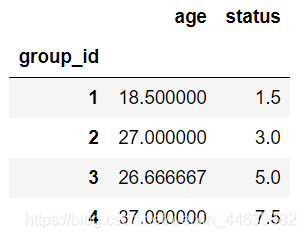
df.groupby(['group_id'], as_index=False).mean()
as_index=False得到的表格就没有使用group_id作为索引。
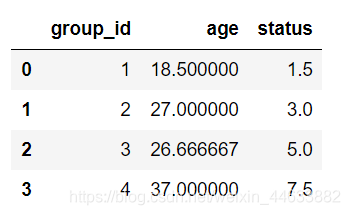
补充使用双属性进行分组
df.groupby(['group_id','age']).mean()
as_index=True得到的是以group_id,age作为索引的DataFrame。
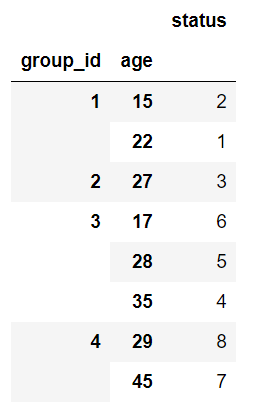
默认使用as_index=True的原因是将分组属性作为索引,这在之后的使用中能增加查询速度。
将属性A,B一起用于分组,也是同样的。
- https://stackoverflow.com/questions/41236370/what-is-as-index-in-groupby-in-pandas
- https://pandas.pydata.org/pandas-docs/stable/reference/api/pandas.DataFrame.groupby.html?highlight=groupby#pandas.DataFrame.groupby
函数pandas.DataFrame.groupby参数as_index的意义含义:as_index决定了分组使用的属性是否成为新的表格的索引,默认是as_index=True,我的代码中常用:as_index=False.使用作为索引只是会影响查询速度,而一般没有这样的需求。as_index=True是常用的表格形式,而as_index=False除了表格有变化,显示也会不同。文档 ...
groupby的操作可以被分为3部分:
第一步,存储于series或
DataFrame中的数据,根据不同的keys会被split(分割)为多个组。(这个分组可以按照不同的轴进行划分,axis=0按照行;axis=1按照列)
第二步,我们可以把
函数例如mean等,apply在每一个组上,产生一个新的值。
第三步,
函数产生的结果被combine(结合)为一个结果对象(result object)。
使用例子来看一下,创建一个
dataframe对象:
df = pd.
DataFrame({'key1' : ['a', 'a', 'b', 'b', 'a'],
在数据预处理过程中可能会遇到这样的问题,如下图:数据中某一个key有多组数据,如何分别对每个key进行相同的运算?
dataframe里面给出了一个group by的一个操作,对于”group by”操作,我们通常是指以下一个或多个操作步骤:
l (Splitting)按照一些规则将数据分为不同的组;
l (Applying)对于每组数据分别执行一个函数;
l (Combining)将结果组合到一个数据结构中;
使用dataframe实现groupby的用法:
# -*- coding: UTF-8 -*-
import pandas as pd
df = pd.DataFrame([{'
DataFrame.loc
Access a
group of rows and columns by label(s) or a boolean array.
.loc[] is primarily label based, but may also be used with a boolean array.
# 可以使用label值,但是也可以使用布尔值
Allowed inputs are: # 可以接受单个的label,多个label的列表,多个label的切片
A single label, e.g. 5 or ‘a’, (note that 5 is in
pandas提供了一个灵活高效的groupby功能,它使你能以一种自然的方式对数据集进行切片、切块、摘要等操作。根据一个或多个键(可以是函数、数组或DataFrame列名)拆分pandas对象。计算分组摘要统计,如计数、平均值、标准差,或用户自定义函数。对DataFrame的列应用各种各样的函数。应用组内转换或其他运算,如规格化、线性回归、排名或选取子集等。计算透视表或交叉表。执行分位数分析以及其他分组分析。
groupby分组函数:
返回值:返回重构格式的DataFrame,特别注意,groupby里面的字段内的数据重构后都会变成索引
groupby(),一般和sum()、mean
官网是这样解释的:https://pandas.pydata.org/pandas-docs/stable/reference/api/pandas.DataFrame.groupby.html
as_index:bool, default True
For aggregated output, return object with group labels as the index. Only ...
#as_
index=
False结果的列名与之前一致
aa=chipo.
groupby(['item_name'],as_
index=
False)['quantity'].sum()
#大类的销售金额 reset_
index(drop=True) 删除原
index
daleijine=df.
groupby(['大类名称'],as_
index=
False)['销售金额'].sum().sort_values(['销售金额'],ascending=
False).reset_
index(drop=True)
cdef cpd.core.groupby.DataFrameGroupBy groups = self.processed_data.groupby(by='车牌号')这段代码在编译时报错:Cython.Compiler.Errors.CompileError: classify_data.pyx
因为在Cython中,只有cdef函数可以使用Cython的高级特性,而cdef变量则只能使用C语言的基础特性。因此,将DataFrameGroupBy对象声明为cdef变量是不合法的。
解决方法是将其声明为普通的Python变量,如下所示:
```python
groups = self.processed_data.groupby(by='车牌号')
如果需要在Cython中使用DataFrameGroupBy对象,则可以在函数参数中声明它们,例如:
```python
cpdef my_function(pandas.core.groupby.DataFrameGroupBy groups):
# function code
这样就可以在函数中使用DataFrameGroupBy对象了。
pycharm远程服务器运行Can‘t run remote python interpreter:Can‘t get remote credentials for deployment server
19589
m0_51723282:
Google Colab 保存和恢复模型(Pytorch)
jjjokerrr:

