



Unity无能狂怒效果-游戏打击感-径向模糊-HDRP设定


功能描述
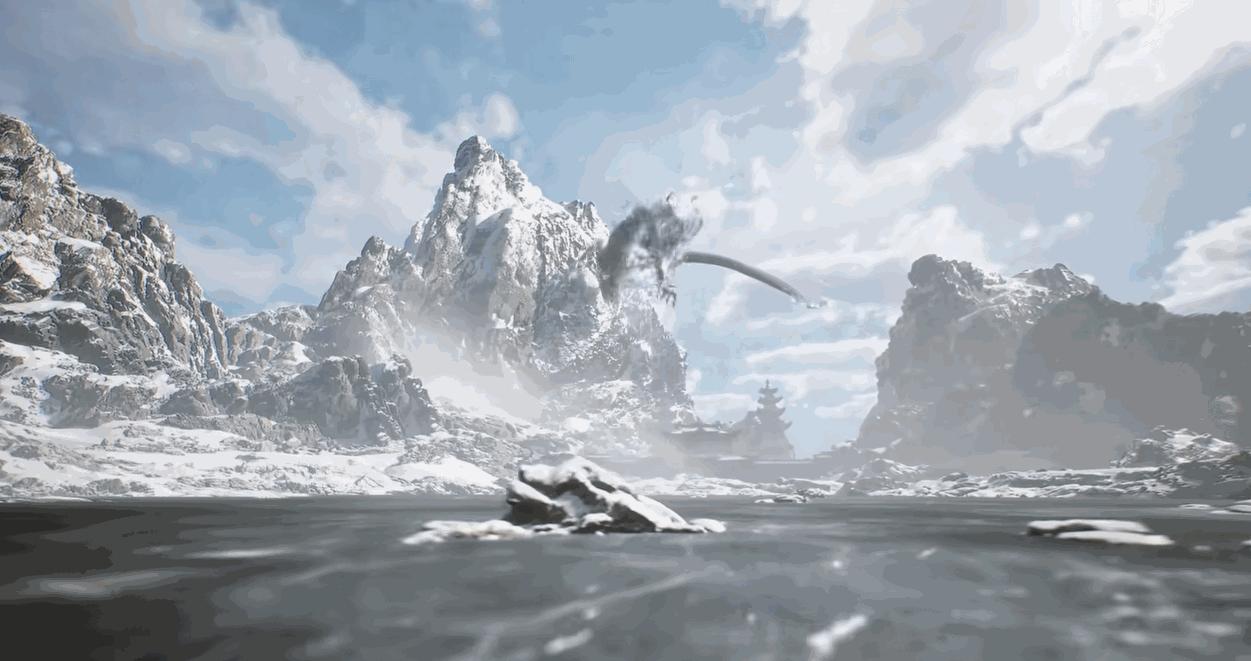
径向模糊在游戏中主要可以用来描述速度感,比如无能狂怒效果,振刀效果,或者瞬移
都可以用 径向模糊 组合 摄像机震荡 来提升 打击感 , 震撼画面感
大部分主流AAA游戏都有这样的效果

实现原理
第一步:确定径向模糊采样中心点,一般取图像中心点
第二步:计算采样像素与中心点距离
第三步:将采样点颜色值加权求和
第四步:与原图像像素做差值运算合成

HDRP渲染设定
我们主要通过PostProcessing像素后处理来实现.
添加一个shader
Shader "Hidden/Shader/RadialBlur"
    HLSLINCLUDE
    #pragma target 4.5
    #pragma only_renderers d3d11 playstation xboxone xboxseries vulkan metal switch
    #include "Packages/com.unity.render-pipelines.core/ShaderLibrary/Common.hlsl"
    #include "Packages/com.unity.render-pipelines.core/ShaderLibrary/Color.hlsl"
    #include "Packages/com.unity.render-pipelines.high-definition/Runtime/ShaderLibrary/ShaderVariables.hlsl"
    #include "Packages/com.unity.render-pipelines.high-definition/Runtime/PostProcessing/Shaders/FXAA.hlsl"
    #include "Packages/com.unity.render-pipelines.high-definition/Runtime/PostProcessing/Shaders/RTUpscale.hlsl"
    struct Attributes
        uint vertexID : SV_VertexID;
        UNITY_VERTEX_INPUT_INSTANCE_ID
    struct Varyings
        float4 positionCS : SV_POSITION;
        float2 texcoord   : TEXCOORD0;
        UNITY_VERTEX_OUTPUT_STEREO
    Varyings Vert(Attributes input)
        Varyings output;
        UNITY_SETUP_INSTANCE_ID(input);
        UNITY_INITIALIZE_VERTEX_OUTPUT_STEREO(output);
        output.positionCS = GetFullScreenTriangleVertexPosition(input.vertexID);
        output.texcoord = GetFullScreenTriangleTexCoord(input.vertexID);
        return output;
    float _Intensity;	// 强度
    float _SampleCount;	// 采样次数
    TEXTURE2D_X(_InputTexture);
    float4 CustomPostProcess(Varyings input) : SV_Target
        UNITY_SETUP_STEREO_EYE_INDEX_POST_VERTEX(input);
        half3 col = 0;
        // uv到中心点距离
        half2 symmetryUv = input.texcoord - 0.5;
        half distance = length(symmetryUv);
        half factor = _Intensity / _SampleCount * distance;
        for(int i = 0; i < _SampleCount; i++)
            half uvOffset = 1 - factor * i;
            half2 uv = symmetryUv * uvOffset + 0.5;
            uint2 positionSS = uv * _ScreenSize.xy;
	    // 加权求和
            col += LOAD_TEXTURE2D_X(_InputTexture, positionSS).rgb;
        // 除于采样次数得到最终值
        col /= _SampleCount;
        return float4(col, 1);
    ENDHLSL
    SubShader
            Name "RadialBlur"
            ZWrite Off
            ZTest Always
            Blend Off
            Cull Off
            HLSLPROGRAM
                #pragma fragment CustomPostProcess
                #pragma vertex Vert
            ENDHLSL
    Fallback Off
c#代码
using System;
using UnityEngine;
using UnityEngine.Rendering;
using UnityEngine.Rendering.HighDefinition;
[Serializable]
[VolumeComponentMenu("Post-processing/Custom/RadialBlur")]
public sealed class RadialBlur : CustomPostProcessVolumeComponent, IPostProcessComponent
    private const string ShaderName = "Hidden/Shader/RadialBlur";
    private static readonly int Intensity = Shader.PropertyToID("_Intensity");
    private static readonly int SampleCount = Shader.PropertyToID("_SampleCount");
    private static readonly int InputTexture = Shader.PropertyToID("_InputTexture");
    public ClampedFloatParameter intensity = new ClampedFloatParameter(0f, 0f, 1f);
    public ClampedIntParameter sampleCount = new ClampedIntParameter(8, 4, 16);
    private Material _material;
    public override CustomPostProcessInjectionPoint injectionPoint => CustomPostProcessInjectionPoint.AfterPostProcess;
    public bool IsActive()
        return _material != null && intensity.value > 0f;
    public override void Setup()
        if (Shader.Find(ShaderName) != null)
            _material = new Material(Shader.Find(ShaderName));
            Debug.LogError($"Unable to find shader '{ShaderName}'. Post Process Volume RadialBlur is unable to load.");
    public override void Render(CommandBuffer cmd, HDCamera camera, RTHandle source, RTHandle destination)
        if (_material == null)
            return;
        _material.SetFloat(Intensity, intensity.value);
        _material.SetFloat(SampleCount, sampleCount.value);
        _material.SetTexture(InputTexture, source);
        HDUtils.DrawFullScreen(cmd, _material, destination);
    public override void Cleanup()
        CoreUtils.Destroy(_material);
}
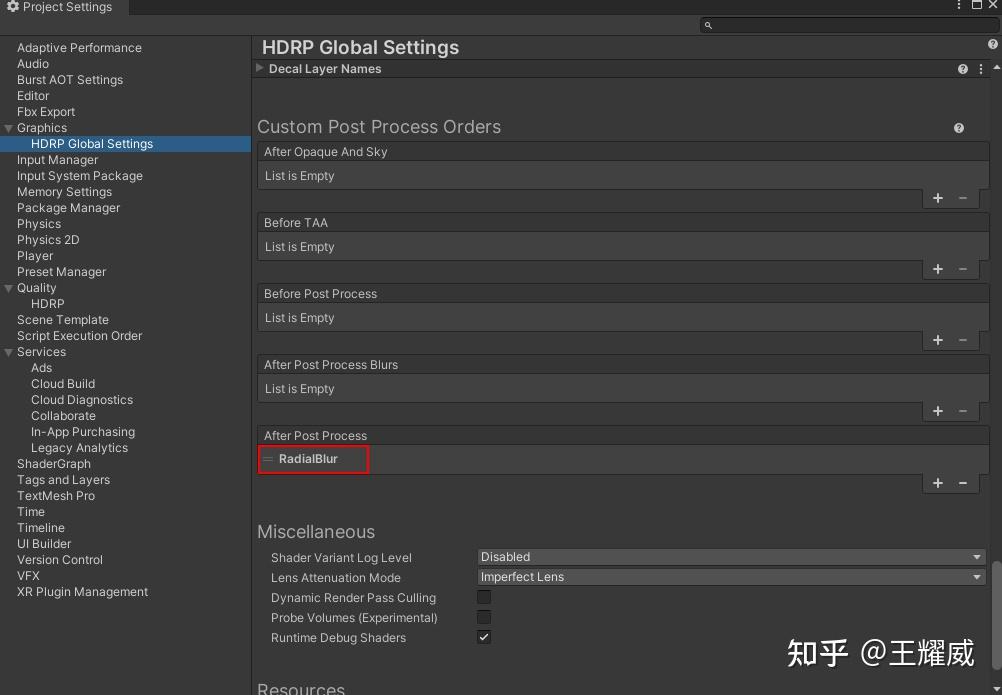
Project setting设置
添加自定义后处理,加入我们写的后处理

在游戏中动态控制
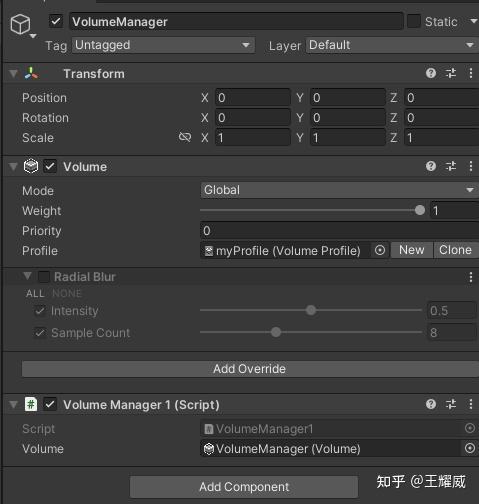
关联好本地的volume,通过VolumeComponent获取到参数,并在游戏中进行控制

using System;
using System.Collections;
using System.Collections.Generic;
using UnityEngine;
using UnityEngine.Rendering;
public class VolumeManager1 : MonoBehaviour
    [SerializeField] private Volume volume;         // 关联当前的volume
    public static VolumeManager1 Instance { get; private set; }
    private FloatParameter vp;  // 当前参数
    private void Awake()
        Instance = this;
    void Start()
        List<VolumeComponent> list=volume.profile.components;
        // 获取第一个float参数
        vp = (FloatParameter)list[0].parameters[0];
    /// <summary>
    /// 径向模糊控制
    /// </summary>
    /// <param name="From">初始值</param>
    /// <param name="To">目标值</param>
    /// <param name="Duration">时间</param>
    /// <param name="StartDelay">延迟</param>
   public void DoRadialBlur(float From, float To, float Duration, float StartDelay)
       StartCoroutine(FadeCoroutine(From,To,Duration,StartDelay));
    IEnumerator FadeCoroutine(float From, float To, float Duration, float StartDelay)
        if (StartDelay>0)
            yield return new WaitForSeconds(StartDelay);
        float t=0;
        while(t<1)
            float v = Mathf.Lerp (From, To, t);